ReadableSTEM turns STEM PDFs into accessible pages
Upload a STEM course PDF or LaTeX source and get one web page a screen reader can read, equations included. What the models read is checked against the PDF’s text, and anything uncertain goes to the instructor.
- Context
- Personal project, 2026
- Read
- 10 min
- Updated
- Built with
- Python, FastAPI, PyMuPDF, LaTeXML, Claude API, MathML, PostgreSQL, Railway
My part
I did the design, the pipeline, the checks and the evaluation, and I made every decision. It’s a solo project.
ReadableSTEM turns a course PDF or LaTeX source into one web page a screen reader can read, and puts every reading it isn’t sure of to the instructor. It is free for anyone with a Google account, and the demo (opens in a new tab) needs no sign-in. The evaluation reports how well it works, from tests I registered (wrote down and hashed) before running them.
What it does
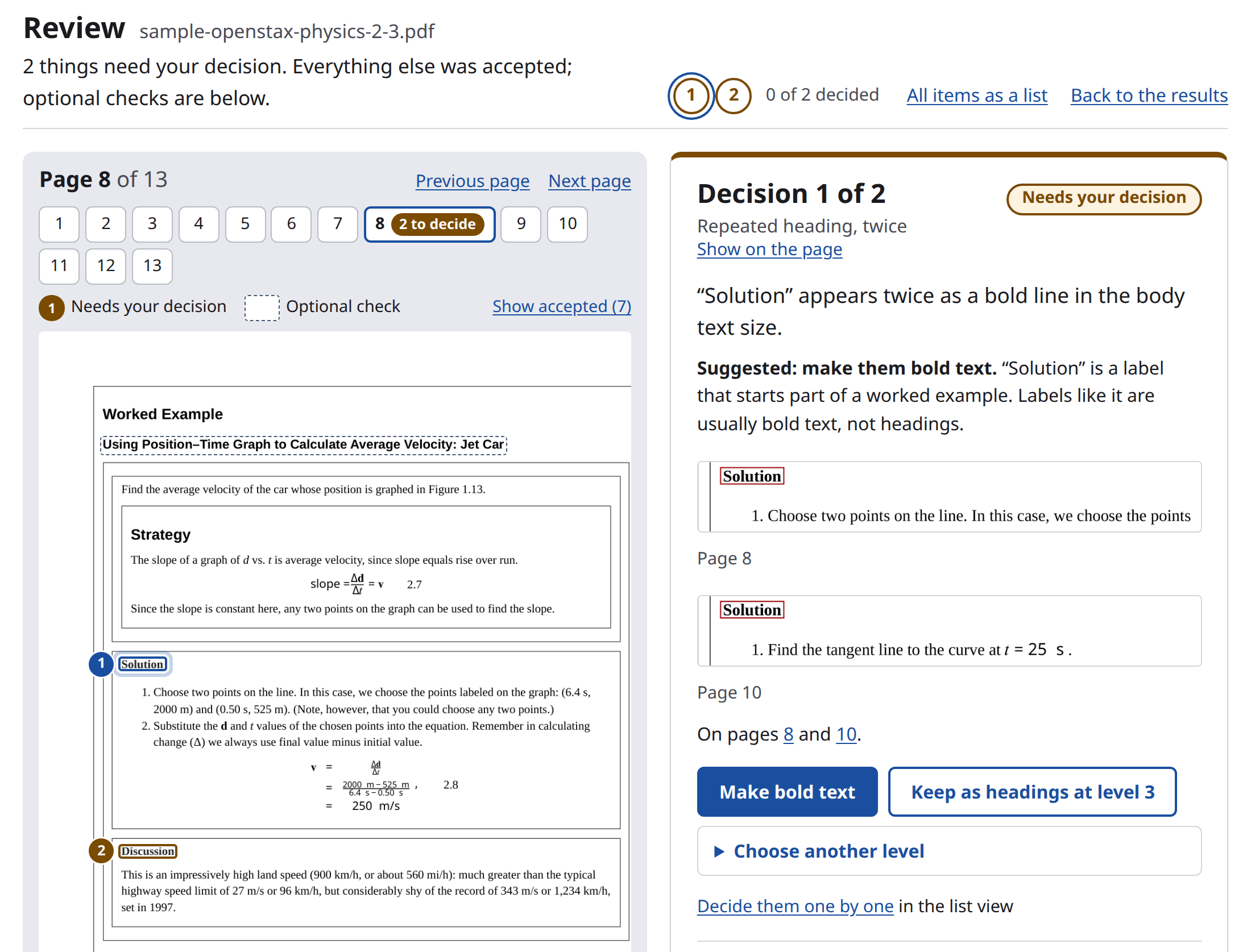
An instructor uploads a course PDF, a LaTeX file or a zip of a LaTeX project and gets back one web page. The equations are in MathML, the web’s markup for math, so a screen reader (software that reads a page aloud) speaks each one with its structure. Headings and lists are real ones, tables are rebuilt as tables, and each figure has a short description.
Anything the tool isn’t sure of becomes a decision for the instructor on a review screen. The page downloads as HTML, Word or EPUB, or as a Canvas page or Common Cartridge package for a course platform. ReadableSTEM doesn’t certify a page as accessible; the instructor decides.
I built it because a screen reader can read the words in a course PDF but not the math. An equation in a PDF is a set of glyphs (character shapes) placed on a page, and when they are read out in a row the equation loses its structure. The Justice Department’s interim final rule of April 20, 2026 (opens in a new tab) covers state and local governments with a total population of 50,000 or more, public universities among them. They have until April 26, 2027 to make their web content meet WCAG 2.1 AA, the standard for accessible web content. The rule has some exceptions and may still change.
| Can a screen-reader user | From the PDF | From the web page |
|---|---|---|
| Can a screen-reader user hear equations with their structure? | The symbols, in a row. In 7 of 17 the fraction bars and subscripts are lost. | All 17, as MathML |
| Can a screen-reader user hear what a figure shows? | No. None of the 7 figures has a description. | All 7 are described |
| Can a screen-reader user jump from section to section? | No. Nothing marks a heading. | 29 headings in one outline, with a skip link and a contents list |
| Can a screen-reader user hear lists as lists? | No. Bullets are read as characters. | 14 real lists |
How it works
ReadableSTEM is one FastAPI service and one Postgres database. The database is the job queue, the file store, the spend ledger and the cache of model answers, so there is only one place to delete a person’s data from. The service runs on Railway for about $5 to $8 a month before model spend.
An upload’s path through the service
Upload
- The service takes a PDF, or LaTeX source (I built this)
- A PDF is opened in a sandboxed child process: 30 s, 768 MB; damaged or hostile files refused (I built this)
- queued: A job row in Postgres: the file bytes stored with it (I built this)
PDF conversion, in a child process the worker can kill
- A worker claims the job: 120 s lease; fewest attempts, then the person served longest ago (I built this)
- The layout, from the PDF’s text layer: read with PyMuPDF; no model call (I built this)
- Claude models read equations, figures and tables: up to 8 at once; each call’s cost reserved first (third-party)
- Each answer checked against the PDF’s own text and glyphs (I built this)
- Person: One HTML file, and decisions for the instructor (I built this)
LaTeX source, instead of the PDF steps
- LaTeXML reads the source: in a sandbox: no network, empty environment (third-party)
- Its MathML goes through the same allowlist sanitizer (I built this)
- Person: The same document model, review and exports (I built this)
The upload returns at once; the page shows progress while a worker converts it. The models and LaTeXML do the reading, and my code decides what is sent to them and what is kept of their answers.
I builtThird-partyA person decides
A worker claims a queued job with SELECT … FOR UPDATE SKIP LOCKED and a 120-second lease that it renews while working. Jobs with the fewest attempts go first, then the one whose owner was served longest ago, then the oldest: one person’s ten documents don’t keep another person’s single one waiting. If the worker dies, the lease runs out and the job is retried, up to 3 times. Model answers are cached per element, and a retry pays only for what’s missing.
The output is one self-contained HTML file with no scripts. Every other format is made from it, which leaves one document to review and check. Its MathML is rebuilt from an allowlist of permitted tags, never pasted from a model’s answer.
Reading the page without a model
The layout comes from the PDF itself. PyMuPDF, a PDF parsing library, reads the text layer (the characters, fonts and positions stored in the file) with no model call. That makes the layout free and deterministic, and it gives every later check something independent of the models to compare against.
Example: What the PDF holds for one formula
- The PDF’s text layer, read in order
𝒪(n−1live2) ([26])Every character is there. The subscript, the exponent and the fraction have lost their places, and the citation that follows the formula runs on from it.- What the page shows
\mathcal{O}(n_\text{live}^{-\frac{1}{2}})The structure is on the page only as positions and sizes. A model reads it from a crop of the page, and the characters of the text layer check that reading.
Tables are found first and taken out, which keeps their numbers from being read as equations. After that, a row that is at least half math with no prose words becomes a display equation.
Two models, and when to escalate
Each equation, figure and table is cropped from the page and read by a vision model: Claude Opus as the main model and Claude Haiku as the cheap one. Short inline equations start on Haiku and escalate to Opus when its confidence is below 0.80, its output is invalid, or a check against the PDF fails.
| Option | What happened | Decision |
|---|---|---|
| Cheap model first for display equations too | 27% cheaper per page at the same accuracy, but the cheap model is confident more often, and 7 more of 302 wrong equations reached the page with no flag | Not shipped |
| A mid-size model as the main model | 45% cheaper, but 39 decisions for the instructor instead of 21, and weaker figure descriptions | Not shipped |
| Cheap first for short inline equations only, escalate on doubt | Display equations stay on the main model | Shipped |
| No escalation when a confidence of 0.80 to 0.85 is the only reason | The main model gave the same math 8 times out of 8, and skipping it cut 7.1% of the cost | Shipped |
The text layer says where an inline formula starts and ends in its sentence, and it is often wrong at a radical, an integral sign or a stacked fraction. So the model also sees the whole line with the cut-out formula boxed, and writes out the full formula the box belongs to. On a registered test this raised the share of equations exactly right by 2.6 points (interval +1.7 to +3.6), and silent errors did not rise, which met the rule I had set for turning it on.
Checking each answer against the PDF
The equation model’s confidence ranked its own errors worse than chance, so confidence alone can’t decide what to accept. Each answer is checked against the PDF’s text layer instead. I never send the model an equation’s own text layer, so it can’t copy it.
| Check | What it does |
|---|---|
| Text comparison | The letters, digits and Greek letters in the reading against the PDF’s, then the numbers (36 is not 63), capitals, bold vectors and signs. Any mismatch needs a decision. |
| Glyph checks | Letter styles read from the fonts (italic against upright, bold against bold italic, script, double-struck), and a reading that runs past its box. Chemistry gets a species check on coefficients, charges, states and arrows. |
| Glyph reconcile | Fixes a reading only where the glyphs allow one answer, such as a named lookalike symbol in a PDF made by TeX. The fix is an optional note beside the model’s reading, and the instructor sees both. |
| Flag policy | Adds a decision for an accepted equation that looks like the readings that turned out wrong. A small logistic model with 22 features and fixed constants, fitted on development documents only, with no model call at run time. It can only add decisions. |
Most wrong readings don’t differ from the text layer in any way these comparisons can see, which is why I added the flag policy. With the 22 features it uses now, its flag recall (the share of wrong equations that get a decision) came in under the bar I had registered, as the evaluation reports.
The instructor decides
Every reading ends in one of two places: it is accepted and listed, or it goes to the instructor as a decision. Every decision costs the instructor time, so a decision is required only for a problem that changes what a student reads. On the first textbook run, that rule cut required decisions across 43 pages from 65 to 10. With the flag policy on, the newest test set needed 2.87 decisions a page, a price I accepted for fewer silent errors.
How an answer moves
Ending one: accepted, with no one asked
- A vision model reads the equation: a short inline equation starts on the cheap model (third-party)
- reading: Checked against the PDF’s text and glyphs (I built this)
- passes: The flag policy: compares it with the readings that turned out wrong (I built this)
- not flagged: Accepted and listed: the instructor can look the list over (I built this)
Ending two: sent to a person
- A reading leaves the row above when:
- a check fails (I built this)
- the model isn’t sure (I built this)
- the flag policy flags it (I built this)
- required: Person: A decision for the instructor: with the page beside it, and both readings where there are two (I built this)
Scanned and handwritten pages, only when the instructor asks
- A vision model reads the page image: there is no text layer to check against (third-party)
- always: Person: Every equation and table goes to review (I built this)
A reading reaches the page without anyone being asked only if it passes every check and the flag policy. Anything else becomes a decision for the instructor.
I builtThird-partyA person decides
On the review screen, one action accepts every equation whose checks passed, and “Listen as a student” plays roughly what a screen reader would say. An owner can share a finished document with named people to view or to review: one access check covers every route, and each decision is recorded under the reviewer’s name.
Scans, handwriting, chemistry and figures
A scanned or handwritten page has no text layer to check against. It is converted only when the instructor asks, and everything read from its image goes to review. I chose that after the handwriting tests, which the evaluation reports, showed that the handwriting itself limits accuracy whatever the prompt.
Chemistry is written in MathML that is shaped so a speech engine reads each formula aloud as chemistry. Charts and diagrams also get a long description, and charts with readable values get a data table, under rules that stop the model inventing a value.
LaTeX source, in a sandbox
An instructor who writes in LaTeX already has the exact equations, and reading them back from a compiled PDF would throw them away and guess them again. A .tex file or a zip of a project goes instead to LaTeXML, an open-source converter that expands the macros as the author’s TeX would and writes MathML. Its output becomes the same document model a PDF becomes, with the same review and exports.
The catch is that a .tex file is a program: it can read files, start programs and loop forever. So LaTeXML runs only inside a sandbox, which is the innermost of the four processes drawn in the next section.
The sandbox fails closed: if it cannot start, the job fails with “upload the PDF instead” and nothing runs outside it. The feature can be turned on only after a start-up probe passes on the deployed image, and it passed on November 4, 2026.
I considered a separate service with no secrets and haven’t built it. The registered results are all for the PDF path, and source jobs have no measured result yet.
Treating every input as untrusted
A file that crashes or hangs its parser must not take the server or the model keys with it. So an upload is only ever opened in a child process that holds no secrets and that its parent can kill. The probe stops a file that breaks the parser at once. The conversion child stops a file that passes the probe and then hangs or exhausts memory.
Where an upload is opened: never in the process that holds the model keys
- Web process:
- The service and its worker: hold the model keys and the database address (I built this)
- Every model request, spend reservation and database write (I built this)
- every uploadProbe child process:
- PyMuPDF opens the file: 41 of 837 malformed test files crashed the parser, and all 41 stopped here (third-party)
- each jobConversion child process:
- The whole conversion: asks the web process for each model request and each write (I built this)
- LaTeX sourceLaTeXML sandbox:
- LaTeXML runs the author’s TeX: inside bubblewrap, or Landlock with a seccomp filter where bubblewrap cannot start, as on Railway (third-party)
Only the web process holds the model keys and the database address. Every process that parses an upload runs without them, under limits, and can be killed without stopping the server.
I builtThird-party
Prompt injection is limited too. The only PDF text a model receives is a short piece of nearby context, fenced as data. The model has no tools, and everything it returns is validated. An injected instruction can at worst produce a wrong equation for review.
Spend capped before it happens
Sign-up is open and I pay the model bill, so the spend caps have to hold under concurrency, retries and bugs. Every model call reserves its worst-case cost before it’s sent, then settles at its real cost.
| Cap on | Limit | How it holds |
|---|---|---|
| The whole service, a day | $10 | One row per day, updated with a conditional UPDATE that concurrent calls can’t overshoot. At $0.022 a page it is about 450 pages a day. |
| All new accounts together, a day | $4 | A pool inside the $10, which stops strangers from taking the instructors’ whole budget. |
| One new account, a day | 150 pages | A page quota, taken with a conditional UPDATE in the same transaction as the job insert. |
| One job | $6 | Covers every retry of the job. |
Stored bytes are capped per person, and the provider’s own limit is the last backstop. The service reaches its spend caps before it runs out of capacity. If it ever gets real traffic, I’ll move the worker out of the web process into its own service. The queue already lives in Postgres and is already fair between people, so no other part has to change.
When things go wrong
| Failure | What happens |
|---|---|
| The model service errors or times out | Up to 2 resends with backoff, then the other model once; anything still failing is kept as the original and flagged |
| A spend cap is reached | The page is still assembled, with the unconverted parts flagged and the job marked “Stopped early” |
| Two tabs reviewing at once | A stale choice is refused and nothing is overwritten |
Built but off, and what is next
| Setting | Why it is off |
|---|---|
| A second model read of each whole page | Its first version raised the score by 1.7 to 2.5 points on development papers but added 0.6 to 1.1 silent errors per 100, over my bar of 0.5. Its second version changed no reading. |
| Display grouping, joining the pieces of one printed display | It waits on a registered run. |
| A second reader for handwriting | It waits on a measurement of what it adds. |
| Beamer source, and zips of several documents | Neither has been tried on real course files. |
| Word and PowerPoint upload | It needs a converter the deployed image doesn’t have. |
The evaluation has both versions of the whole-page read.
Still open:
- The registered claim still needs silent errors under 4.0 per 100 and a higher flag recall, and that is the equation work I’ll do next.
- The chemistry score is below its bar of 0.80.
- The long figure descriptions are unmeasured: the second figure set has a pre-registration that I haven’t signed.
- The screen-reader test has a written protocol and no results.
- The accessibility conformance report (the form institutions ask a vendor for) is a draft, and the Canvas export hasn’t been tried in a real Canvas.